Introduction to Uizard
In the ever-evolving world of digital product development, speed and simplicity are key. Designers, developers, and product teams constantly seek tools that streamline workflows without compromising quality. Enter Uizard, an AI-powered design platform that promises to simplify the process of UI/UX design, making it accessible to both seasoned designers and non-designers alike. Launched with the goal of democratizing design, Uizard combines machine learning with intuitive drag-and-drop features to help users go from idea to interactive prototype in minutes. This review explores Uizard’s core features, usability, pricing, strengths, and limitations, offering a comprehensive look at whether it’s worth the hype.
Core Features and Functionality
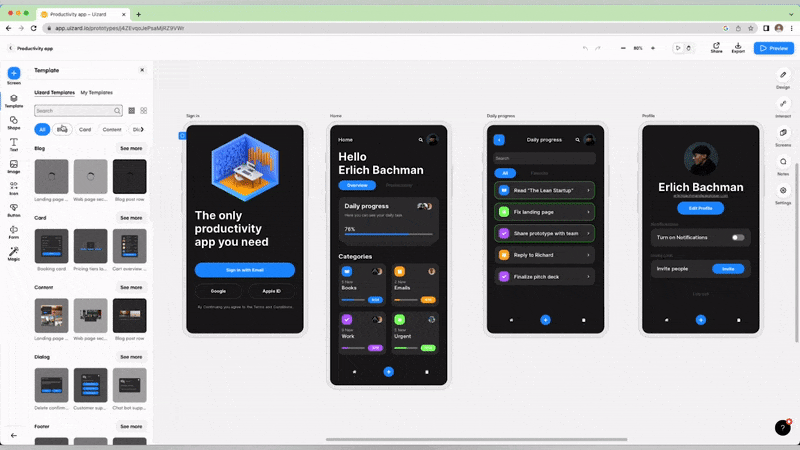
One of Uizard’s standout features is its AI-driven design assistant. Users can import hand-drawn sketches, wireframes, or even screenshots of existing apps, and Uizard uizard review intelligently transforms them into editable digital designs. This functionality is a major time-saver for product managers or startup founders who may not have formal design skills but want to communicate ideas quickly and clearly. Additionally, Uizard includes a large library of pre-designed components, templates, and themes, which users can customize without writing any code. These features make it ideal for rapid prototyping and brainstorming sessions.
Another strong feature is Uizard’s collaborative environment. Teams can work together in real-time, similar to tools like Figma or Google Docs, enabling faster feedback and iteration. Stakeholders can comment directly on design elements, making it easier to collect feedback during the early stages of product development. Uizard also integrates well with other productivity tools, allowing exports to formats like PDF or sharing links for user testing.
Usability and Learning Curve
What makes Uizard particularly attractive to non-designers is its emphasis on ease of use. The user interface is clean, intuitive, and doesn’t overwhelm with options. While advanced design tools like Adobe XD or Sketch may require training, Uizard is built for instant use. Even beginners can jump in and create something functional within their first hour of use. The AI suggestions, smart auto-layout, and helpful tooltips make navigating the platform smooth. However, professionals used to more robust tools may find Uizard’s capabilities somewhat limited in terms of pixel-level customization or advanced interactions.
Pricing and Accessibility
Uizard offers a freemium model, which includes access to basic features such as wireframing, basic templates, and limited export options. This is great for individuals or small teams testing out the platform. The Pro and Business plans unlock more advanced functionalities such as custom branding, higher export quality, unlimited projects, and team collaboration features. Compared to other UI/UX tools, Uizard’s pricing is competitive, especially when considering the AI enhancements and time saved on mockups and prototypes.
Pros and Cons
There are several pros to using Uizard. Its AI-powered transformation of sketches into prototypes is a game-changer for fast-paced teams. It also reduces dependency on professional designers in the early ideation stages, which can be cost-effective for startups. Real-time collaboration and ease of use make it highly accessible. However, the cons include limited design depth, as the tool isn’t meant for high-fidelity design work or complex animations. Also, while AI-generated suggestions are helpful, they may not always align with advanced branding or design system requirements.
Final Verdict
Uizard is an impressive tool for anyone looking to turn ideas into UI prototypes quickly. Whether you’re a startup founder, product manager, or marketer trying to visualize a concept, Uizard offers a powerful platform that removes traditional design barriers. While it may not replace high-end design tools for professionals needing full creative control, it fills a unique niche by combining AI, simplicity, and accessibility. For teams that prioritize speed and collaboration during the ideation phase, Uizard is definitely worth considering.
C